
How to Set Up Any Router: Step-by-Step Guide for Beginners
Setting up a new router is easier than you think! With a few simple steps, you can quickly get your home network up and running—securely and efficiently.
1. Prepare Your Equipment
-
Unbox your router and gather its power cable, Ethernet cable, and user manual.
-
Make sure you have your modem, internet provider information, and a device (laptop or smartphone) for setup.
2. Position Your Router
-
Choose a central, open location in your home to maximize Wi-Fi coverage.
-
Install any antennas provided and keep your router away from thick walls and electronic clutter.
3. Connect to Your Internet Source
-
Power off your modem before connecting.
-
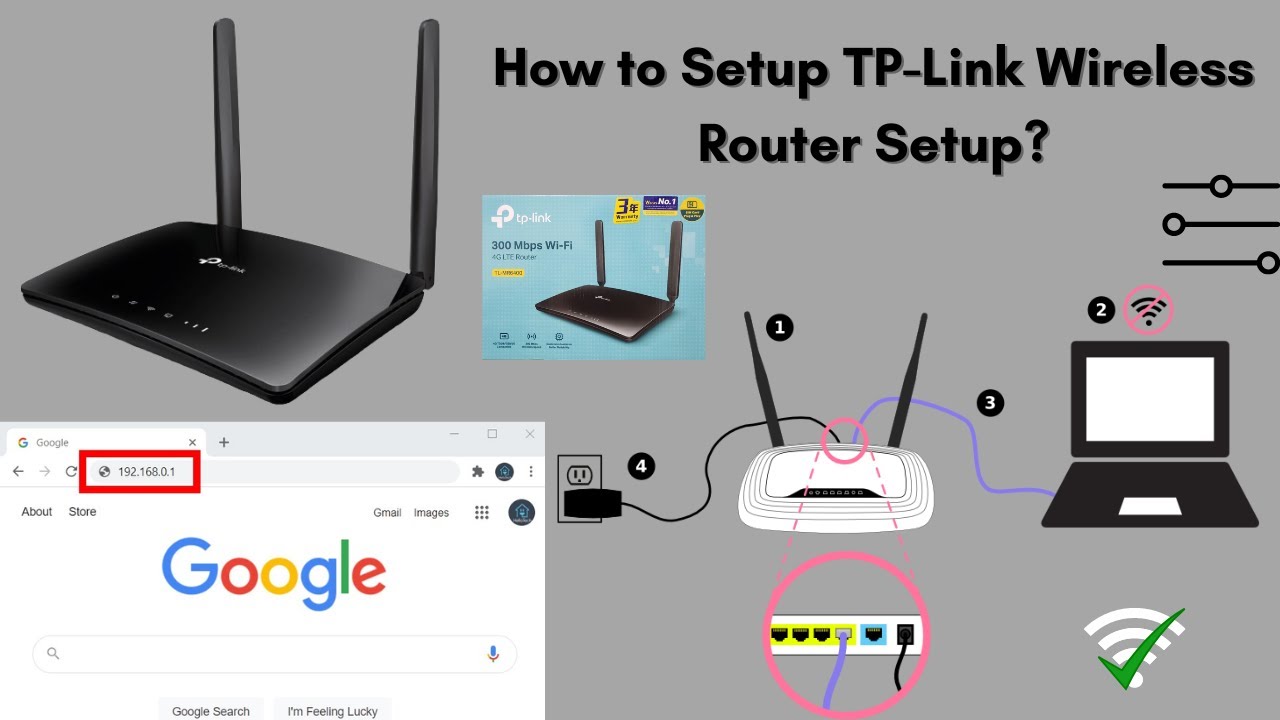
Use an Ethernet cable to connect the modem to the router’s WAN or Internet port.
-
Power on your modem first, wait 2-3 minutes, then power on the router.
4. Access the Router Dashboard
-
Connect your device to the router using an Ethernet cable or default Wi-Fi credentials.
-
Open a browser and enter the router’s IP address, usually 192.168.0.1 or 192.168.1.1.
-
Log in with the default admin username and password (most often “admin”).
5. Configure Basic Settings
-
Change the default router login password for security.
-
Update router firmware if updates are available.
-
Set your Wi-Fi network name (SSID) and password. Use strong, unique passwords for Wi-Fi and admin access.
6. Set Up Your Wireless Network
-
Configure network mode (mixed, 2.4GHz, 5GHz) and select the least crowded wireless channels.
-
Enable WPA2 or WPA3 security for robust protection.
-
Adjust antenna position, activate MU-MIMO and beamforming if available.
7. Connect Your Devices
-
Search for your new Wi-Fi network on laptops, smartphones, and smart devices.
-
Enter your new Wi-Fi password and verify each device can access the internet.
8. Test and Optimize
-
Check your connection throughout the house for dead spots.
-
Relocate the router or tweak settings for best performance.
-
Enjoy fast, stable, and secure Wi-Fi across your home.
If you run into issues, reboot the router or consult the manual for troubleshooting advice. With these steps, beginners can set up any modern router with confidence and create a reliable network for work, streaming, or gaming.